


PDF Extra - Scan Edit View Fill Sign Convert
办公商务
扫描打印
开发者:
MobileSystemsINC
应用介绍: Get all the PDF features you need with a single app! The professional PDF editor allows you to view, annotate and print PDF files while on the go.What PDF Extra can offer you:Scan to PDFsScan and digitize your paper documents into editable files with ease. Create one-page PDFs or scan a dozen in a single file using the auto batch option.View and CommentMake comments on PDFs using sticky notes and drawing tools. Highlight and markup text with the annotation tools.Edit PDF filesEdit PDFs with the most advanced mobile editor available. Feel free to change any document aspect you want - texts, pictures, design, signatures, certificates and more.Organize pages in PDFsView and organize pages in PDFs – Enjoy full control of your PDF’s structure. Rotate, delete and rearrange pages to create a perfectly organized PDF file.Export to JPEGA picture tells a thousand words. Use the free JPEG converter to quickly turn a PDF into an image file.Convert PDFsConvert PDFs to Word, Excel or ePub while keeping the original layout and formatting. Save Word, Excel and ePub files as PDFs and share them with ease.Read & PrintQuickly open and view PDFs. The optimized Read mode gives you the best reading experience – continuous, page mode or outline, with a Night mode and a “text to speech” feature. Print documents or just the selected pages you need.Fill and SignFill out and sign PDF forms on the go, directly from your mobile device. Advanced support for fillable PDF forms allows you make all the changes you need and to sign documents with your saved digital signature or by simply drawing the signature on the document.Protect PDFsProtect your sensitive documents with passwords to lock, encrypt and restrict the access to them. Work with advanced PDF certificates to validate their authenticity. Integrated File ManagerManage your local and remote documents with ease. Quickly locate your PDFs in the device`s “My Documents” folder, browse your local storage, or access and sync your documents on the cloud.MobiSystems DriveEnjoy 5GB Free cloud storage for your files and access them securely anytime. Connect to any popular cloud account such as Dropbox, Google Drive, Box to access your PDF files.Upgrade to Premium and get the most of PDF Extra• Edit PDF files – Change text, pictures, design and more• Organize pages in PDFs – Rotate, Delete and Rearrange• Convert PDFs to/from Word, Excel or ePub• Fill and Sign PDF forms with timestamps and digital signatures• Protect PDFs with passwords and certificationsKEY ADVANTAGES • Flexible and modern user interface to suit your needs • Real-time tracking of your document frame providing the quickest and most accurate edge detection available for Android • Advanced camera configuration and full customization of the resulting PDF file • Optical Character Recognition for swift photo to text conversions in 49 languagesADVANCED SCANNING - Portable document scanning with a wide range of advanced camera features. • Streamlined interface to make faster scans • Real-time tracking of your document frame • Batch scanning for multipage documents • Ability to readjust scanned pages with new zoom and crop levels • Custom scene and focus modes • Image capture in portrait and landscape orientation • Configurable color effects including white balance and exposure compensation along with custom contrast in brighten threshold modeINTELLIGENT IMPORT OF EXTERNAL IMAGES - Import images and add them to your PDF documents. • Advanced integration with File Commander for easier image importing • Save scanned documents as images • Supports BMP, GIF, PNG, WEBP, and JPEG image formats • Work with external/internal device storage and create PDFs from existing image files • Import from connected cloud storage accounts such as Dropbox, Google Drive and more PDF EXPORT AND CONFIGURATION - Configure your PDFs to get the best possible accuracy and quality • Multi-page Optical Character Recognition (OCR) for easy document digitization • Automatic Backup and Restore to a connected Google Drive account • Custom page size - from the commonly used A4 and letter formats to any user-defined size • Cover page creator - for a document to be shown as a thumbnail in the documents list • Delete, add, copy, and move pages in custom documents • Save individual pages as images • Specify page formats, margins, quality, and resolution • Advanced PDF configuration can be applied to the whole document or just a single pageEASY PDF MANAGEMENT AND SHARING - Browse, manage, store, and share your created PDFs. • Print to networked and cloud-connected printers • Favorites and Recent folders for easy access to created PDFs • Sort documents by their name, number of pages, and time of creation • Search by document name • Share via email, Bluetooth, Wi-Fi Direct, social networks, and cloud storage accounts** This version of Quick PDF Scanner lets you create your first 10 scans FREE! *** Add-ons for Xperia camera
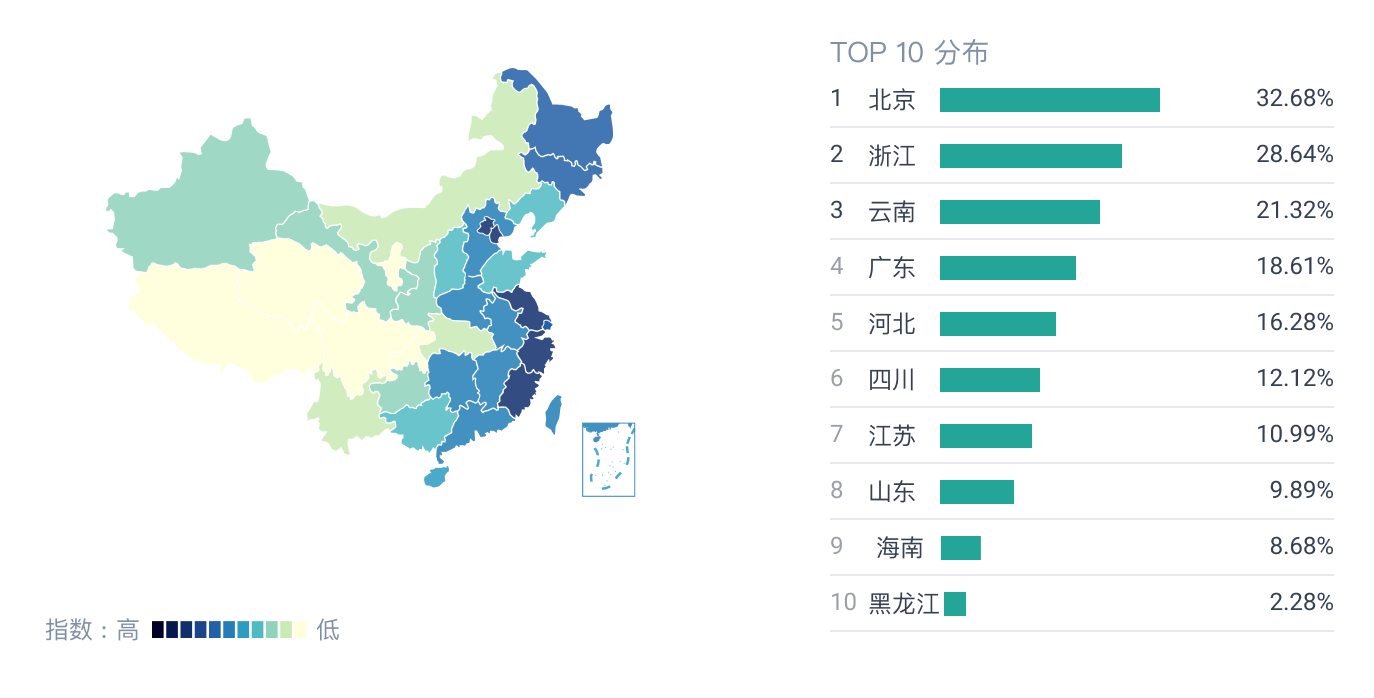
覆盖渗透率:
0.006%
应用大小:
67.9M
应用上线时间:
2016.01.03